
Give Customers a BetterWay to Order Print.
Web-to-print software gives customers controlled online access to the print products, pricing and ordering workflows relevant to them.
Online ordering at the front. Print workflow behind it.
- 01
Create private storefronts for customers, branches and approved users.
- 02
Then connect those orders directly with the print MIS running the business behind them.
An Online Route Into the Print Business.
Web-to-print software allows customers to access print products and services through an online storefront or portal.
Depending on the workflow, customers can:
- Access Their Own Storefront
- Select Approved Products
- Enter Quantities
- Obtain Pricing
- Personalise Templates
- Submit Requirements
- Approve Quotes
- Place Orders
- Reorder Regular Products
The objective is not simply to put print products on a website.
It is to give customers a controlled, convenient way to interact with the print business.
Give Each Customer the Experience They Need.
Not every customer should see the same products, prices or ordering options. Private web-to-print storefronts allow the ordering environment to be configured around the organisation using it.
- 01
Customer-Specific Storefronts
Provide a dedicated online ordering area for an individual customer or account.
- 02
Multiple Locations
Support organisations with multiple branches, departments or delivery locations.
- 03
Controlled Products
Give users access to the products relevant to their organisation.
- 04
Reorder Workflows
Make repeat print requirements easier to order without rebuilding the specification each time.
- 05
Approved Users
Control who can access the storefront and place orders.
The right products. The right users. The right ordering environment.
More Than Add a Product to a Basket.
- 01
Basic Estimating
Allow users to obtain pricing for supported print products and specifications.
- 02
Online Design
Give customers tools to personalise approved artwork and templates.
- 03
Quote Approval
Allow quotations to move through customer approval before work proceeds.
- 04
Job Entry
Turn approved customer requirements into work that can enter the production workflow.
- 05
Repeat Ordering
Give customers a faster route for frequently purchased products.
- 06
Multi-Location Ordering
Support organisations ordering for different branches, departments and delivery destinations.
From customer requirement to print order — online.
What the Customer Actually Sees.
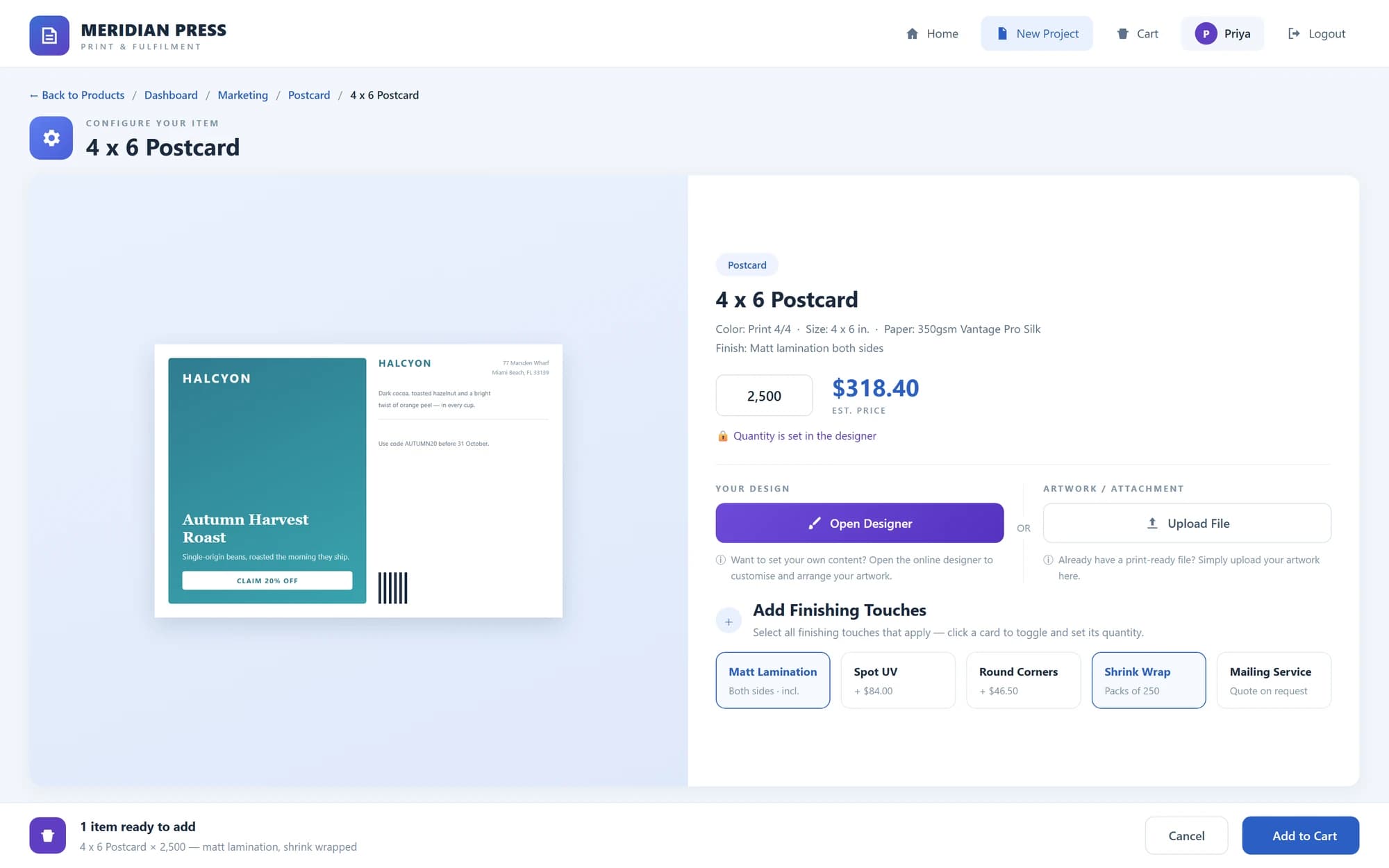
- 01
Private Storefront
The customer's own ordering environment — approved products, their pricing, their locations, their repeat orders.
- 02
Online Designer
Template personalisation, artwork placement and variable data, before the requirement becomes a job.
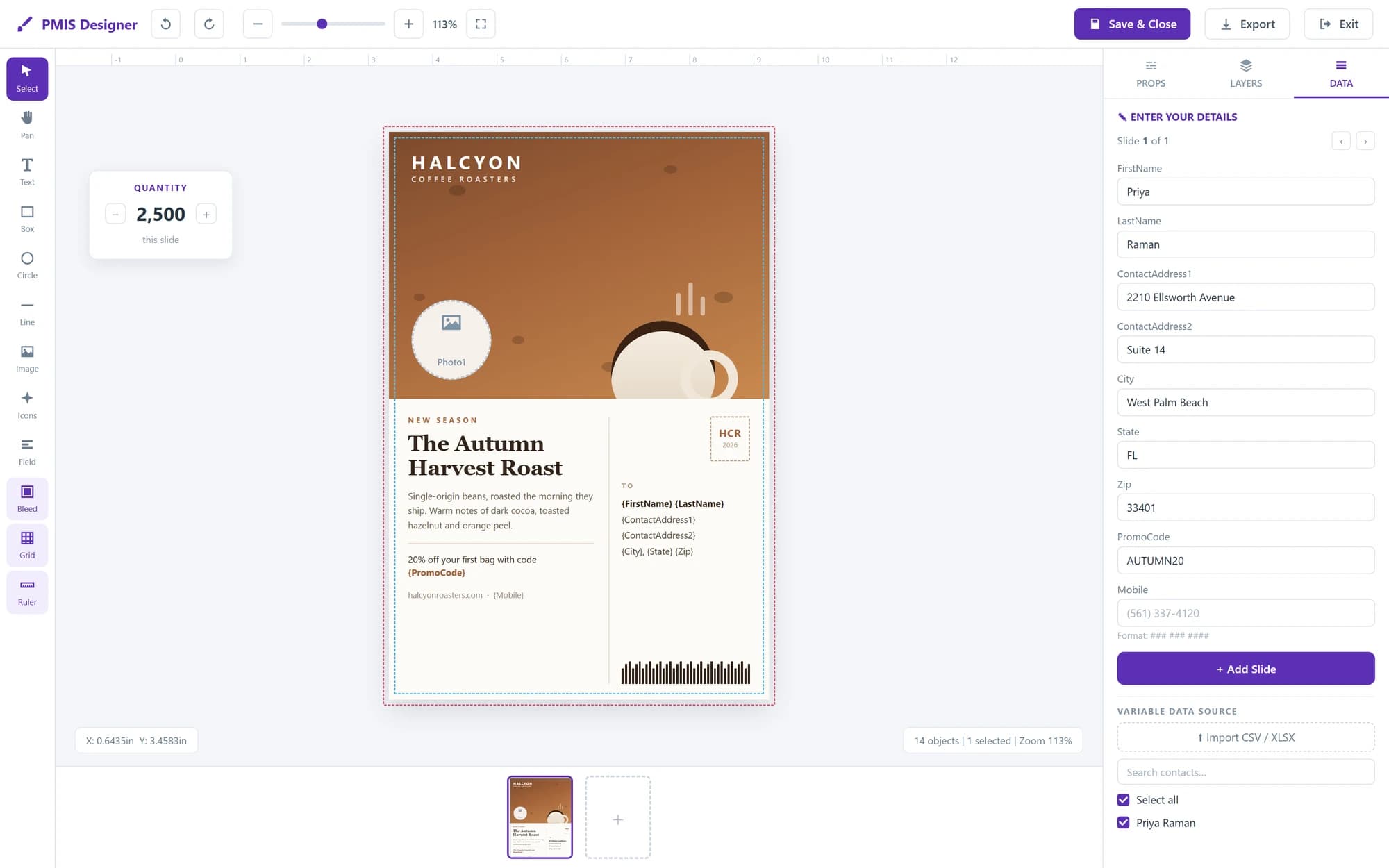
Product views shown with sample data.
From Login to Production.
Customer Access
The customer, branch or approved user enters their private storefront.
Select the Requirement
Choose an approved product, specification or repeat requirement.
Configure the Order
Enter quantity, options, personalisation, location and other required information.
Price or Approve
Obtain pricing where applicable or move the requirement through the appropriate quotation and approval workflow.
Submit the Order
The customer confirms the requirement.
Move Into Production
When web-to-print is connected to the MIS, the order becomes part of the operational print workflow.
Login → Select → Configure → Approve → Order → Production
The Order Still Has to Be Produced.
A standalone web-to-print storefront can collect an order.
But the print business still needs to:
- 01Estimate
- 02Create the Job
- 03Plan Production
- 04Purchase Materials or Outsourced Services
- 05Manage Inventory
- 06Deliver the Work
- 07Create the Invoice
If the storefront is disconnected from those processes, online ordering can simply move administration from the customer to your internal team.
The order arrives digitally. Then someone re-enters it manually.
That is the gap Web-to-Print MIS is designed to remove.
Customer-Facing Software Connected to the Back Office.
Web-to-print and print MIS perform different roles.
Web-to-Print
The customer-facing environment.
Storefront → Products → Pricing → Personalisation → Approval → Order
Print MIS
The operational environment behind the order.
Estimate → Job → Production → Purchasing → Warehouse → Delivery → Invoice
Web-to-Print MIS
Connects both sides.
Customer → Storefront → MIS → Production → Fulfilment → Invoice
The customer gets an easier way to buy.
The printer gets an order that enters the system running the business.
Built for Repeatable and Controlled Print Buying.
- 01
Corporate Print Portals
Give corporate customers a controlled place to order approved printed materials.
- 02
Multi-Location Organisations
Support branches, departments and locations ordering from the same controlled environment.
- 03
Repeat Print Orders
Reduce the effort required to reorder products that have already been specified.
- 04
Approved Templates
Allow users to personalise controlled designs without creating new artwork from scratch.
- 05
Branded Materials
Maintain control over the products and templates available to individual customers.
- 06
Standard Print Products
Give customers a self-service route for products that do not require a salesperson to rebuild the order every time.
- 07
Quote & Approval Workflows
Allow print requirements to be priced and approved online before entering production.
Automate the repeatable work. Keep people focused on the work that needs them.
For Printers and Organisations Managing Repeat Print.
Commercial Printers
Give customers an online ordering route connected to the production business behind it.
Digital Printers
Support repeat, short-run and customer-specific ordering.
Print Management Companies
Create controlled portals for clients while managing production and suppliers behind the scenes.
Print Brokers
Give regular customers structured access to products and ordering.
In-Plants
Provide internal users and departments with a controlled print ordering environment.
Multi-Location Customers
Allow branches and locations to order approved print through one central system.
Print Requires More Than a Shopping Cart.
Generic ecommerce works well when the product is fixed.
Print often is not.
The requirement may include:
- Quantity
- Size
- Stock
- Inks
- Finishing
- Personalisation
- Artwork
- Delivery Location
- Approval
- Customer-Specific Pricing
That is why web-to-print software needs to understand more than products, baskets and payments. It needs to support the information required to produce the print.
Choose the Workflow, Not Just the Storefront Design.
When comparing web-to-print systems, ask:
Can I Create Private Customer Storefronts?
Different customers should be able to access different environments.
Can It Support Multiple Locations?
Corporate and distributed customers often need branch, department and location control.
Can Customers Personalise Approved Products?
Template-based design can reduce repetitive artwork changes.
Can It Handle Quotes and Approvals?
Not every print order should go immediately into production.
Can Customers Reorder?
Repeat work should be simpler than the original order.
Does It Connect to the MIS?
An order should be able to continue into estimating, jobs, production and fulfilment without unnecessary re-entry.
Can It Grow With the Customer?
A storefront should support changing product, location and workflow requirements over time.
The storefront is only valuable if the workflow behind it works.
Web-to-Print at the Front. Print MIS at the Core.
ePRO combines the customer-facing web-to-print environment with the management information system behind it.
Web-to-Print
- Private Storefront Dashboard
- Multiple-Location Login
- Basic Estimator
- Design Tool
- Quote Approval
- Job Entry
- Repeat Ordering Workflows
Print MIS
- CRM
- Estimating
- RFQs
- Jobs
- Production
- Purchasing
- Warehouse & Inventory
- Delivery
- Invoicing
- Reporting
The customer interacts with the storefront. The print business manages what happens next through the MIS.
One customer experience. One connected operational workflow.
Choose the Level of Control You Need.
Web-to-Print Requirement
You may primarily need to:
- 01Give customers an online ordering portal
- 02Provide approved products
- 03Support customer locations
- 04Allow personalisation
- 05Enable repeat ordering
- 06Manage online quote approval
Complete Web-to-Print MIS Requirement
You may also need to:
- 01Estimate internally
- 02Manage jobs
- 03Control production
- 04Raise supplier RFQs
- 05Purchase materials and services
- 06Manage warehouse inventory
- 07Deliver and fulfil orders
- 08Invoice customers
- 09Report across the business
ePRO connects both requirements within the same platform.
Explore ePROMore Than 20 Years Developing Software for Print.
Customer-facing convenience. Print-industry workflow behind it.
Print Management Information Systems has been developing software around the commercial and operational requirements of print since 2003. More than 400 Print MIS installations contribute to that experience.
That experience includes the processes that sit on both sides of web-to-print:
The customer ordering experience.
And the print operation responsible for delivering it.
Frequently asked questions
What is web-to-print software?
Web-to-print software allows customers to access print products and services online through a storefront or portal. Depending on the workflow, users can select products, obtain pricing, personalise templates, approve quotations and place orders.
What is a private print storefront?
A private storefront is a controlled online ordering environment created for a particular customer, organisation, branch or group of users.
Who uses web-to-print software?
Web-to-print is used by commercial printers, digital printers, print brokers, print management companies, in-plants and organisations managing repeat or distributed print requirements.
Can each customer have different products?
Yes. Private storefronts can be structured around the products and ordering options relevant to individual customers.
Can web-to-print support customers with multiple locations?
Yes. ePRO supports multiple-location workflows for organisations with branches, departments and different delivery destinations.
Can customers personalise print online?
Yes. ePRO includes an online design tool for supported personalised products and templates.
Can customers obtain print pricing online?
Yes. ePRO includes a basic estimator for supported web-to-print products and specifications.
Can quotations require approval?
Yes. Quote approval can be incorporated into the customer workflow before the requirement proceeds.
Can customers reorder products?
Yes. Web-to-print is particularly effective for repeat products because users can return to an established ordering environment rather than rebuilding the requirement each time.
What is the difference between web-to-print and print MIS?
Web-to-print is primarily customer-facing. Print MIS manages the internal commercial and operational workflow required to estimate, produce, purchase, deliver and invoice the work.
Should web-to-print connect to a print MIS?
For printers that need operational control behind the online order, yes. Connecting the storefront with the MIS reduces unnecessary re-entry and allows customer activity to continue into the internal workflow.
What is ePRO Web-to-Print MIS?
ePRO combines customer-facing web-to-print with the Print MIS used to manage estimating, RFQs, jobs, production, purchasing, warehouse, delivery, invoicing and reporting.
Connect Online Ordering With the Business Behind It.
Create controlled customer storefronts. Support multiple locations. Provide online estimating and personalisation. Manage approvals and repeat ordering. Then connect the order to the MIS responsible for producing, fulfilling and invoicing it.
Web-to-print at the front. Print MIS at the core.
